Getting Started
Fork and Clone the Repository
Fork the repositorty of the site on our GitHub.
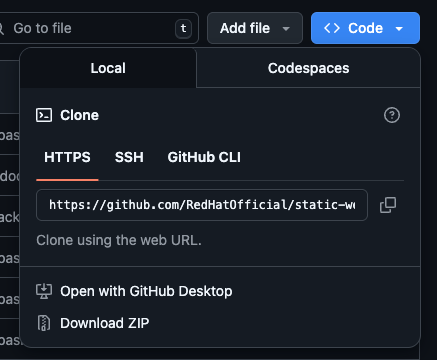
Clone your fork to your own computer then using this command and replacing the link with your own HTTPS clone link found underneath the Code button (see image below):
git clone https://github.com/[USERNAME]/[NAME-OF-FORK]
Start the Site
Install Node.js if you do not have it on your local machine.
Run node --version in your terminal to check to see if you have it installed correctly. It should come back with a version number (vX.Y.Z):
Run a fresh install of npm on the project:
cd [NAME-OF-FILE]
npm install
Run the server itself with this command:
npm start
The cd command changes the directory you're working with.
The npm start command builds your website locally and serves it through a development server, ready for you to view at http://localhost:3000/.
Open docs/intro.md (this page) and edit some lines: the site reloads automatically and displays your changes.
Using Docusaurus
Docusaurus is a static-site generator that convetakes Markdown files and donverts them into a documentation website. It is written in JavaScript however no prior knowledge of JavaScript is needed to edit the website.